Travel security information can change depending on the destination, technology, financial provider, and local regulations. Check official government, embassy, airline, bank, accommodation, and service-provider guidance for current requirements before and during your trip.
Secure Travel Safety Handbook: Protect Your Data, Money, and Identity
International travel can expose travelers to risks that are easy to overlook, including lost devices, stolen wallets, payment-card fraud, phishing attempts, identity theft, and opportunistic scams. These risks are not limited to any particular destination, and many can be reduced through simple preparation.
A practical travel-security plan does not require carrying specialized equipment or avoiding public places. The most useful habits are straightforward: secure your devices, use strong account protection, separate payment methods, protect important documents, remain cautious in crowded areas, and know what to do if something is lost or stolen.
This guide covers digital security, payment protection, physical safety, document management, common scam patterns, and an emergency plan that can be prepared before departure.
Use this guide alongside your trip plan: If you are preparing for a multi-country backpacking journey, our Europe Backpacking Manual provides destination and route-planning context that complements these security precautions.
Why Can Travelers Be Vulnerable to Theft and Scams?
Travelers often have several characteristics that can make them easier targets for opportunistic crime. They may be unfamiliar with local transport systems, distracted by navigation, carrying luggage, using unfamiliar payment methods, or dealing with language differences.
- Distraction: Navigation, luggage, schedules, and unfamiliar surroundings can reduce awareness.
- Limited local knowledge: Visitors may not know typical transport procedures, ticketing systems, or common local scams.
- Digital exposure: Travelers frequently use unfamiliar networks, charging points, websites, and apps.
- Valuable belongings: Smartphones, cameras, passports, payment cards, and laptops can attract unwanted attention.
- Urgency: Scammers often try to create pressure so that a traveler makes a quick decision without verifying the situation.
What Are the Main Travel Security Risks?
| Risk | Where It Can Occur | Practical Protection |
|---|---|---|
| Pickpocketing | Crowded transport, markets, queues, and busy attractions | Keep valuables secured and remain aware of your surroundings. |
| Payment-card fraud | ATMs, payment terminals, online bookings, and compromised accounts | Use trusted payment locations, protect your PIN, and monitor transactions. |
| Phishing and account theft | Messages, email, fake websites, and fraudulent booking communications | Verify links, use MFA, and avoid entering credentials through suspicious pages. |
| Device loss or theft | Transport, accommodation, restaurants, beaches, and public spaces | Enable device tracking, screen locks, backups, and remote-lock features. |
| Identity-document loss | Transport, accommodation, border crossings, and crowded areas | Keep documents secure and maintain accessible copies of important information. |
How Should You Prepare Your Devices and Accounts Before Travel?
Secure Your Smartphone and Tablet
- Install current updates: Update the operating system and important apps before departure.
- Use a strong screen lock: Choose a passcode that is not based on an easily guessed birthday or repeating number.
- Enable biometric protection: Fingerprint or face authentication can add a convenient layer of security where supported.
- Enable device tracking: Activate Apple’s Find My or Google’s Find My Device, depending on your device.
- Review automatic connections: Disable automatic connections to unfamiliar Wi-Fi networks and review Bluetooth settings.
- Remove unnecessary sensitive files: Do not carry old documents or personal information that you do not need during the trip.
Protect Laptops and External Storage
- Enable full-disk encryption when supported by your operating system.
- Use a standard user account for everyday activities when practical.
- Keep security software and operating-system updates current.
- Avoid storing sensitive passwords in plain-text documents.
- Do not leave laptops or external drives unattended in public areas.
How Can You Strengthen Important Accounts?
- Use unique passwords: A password manager can help create and store different passwords for important accounts.
- Enable multi-factor authentication: Protect email, banking, travel, cloud-storage, and other important accounts.
- Prefer stronger authentication methods: Where available, consider passkeys or authenticator-based methods in addition to other supported options.
- Review account access: Remove old devices, applications, and sessions that you no longer use.
- Check financial notifications: Enable transaction alerts through your bank or card provider when available.
How Should You Back Up Important Travel Information?
Before departure, create secure copies of essential travel information. Keep backups in more than one location so losing a phone or bag does not also mean losing access to important documents.
- Passport identification page and relevant visa information.
- Travel insurance details and emergency contacts.
- Important booking confirmations.
- Bank and card-provider contact information.
- Copies of other documents that may be needed during the trip.
Store digital copies in a secure account and keep an additional offline copy when appropriate. Avoid keeping all copies in the same bag or on the same device.
For cruise travelers: These document and payment precautions are particularly useful when moving between ports. Our Mediterranean Cruise Packing & Port Planning Guide covers additional preparation for documents, shore excursions, and port-day planning.
How Can You Connect Safely While Traveling?
What Should You Know About Public Wi-Fi?
Public Wi-Fi is not automatically unsafe, but travelers should avoid assuming that an unfamiliar network is trustworthy. Fraudulent networks can imitate legitimate names, and attackers may attempt phishing or other forms of interception.
- Confirm the correct network name with the hotel, airport, restaurant, or other provider.
- Avoid entering sensitive information through unfamiliar websites or links.
- Use HTTPS websites and keep your browser and device updated.
- Use mobile data for particularly sensitive tasks when that is practical.
- A reputable VPN can provide additional protection, particularly when using untrusted networks, but it does not replace secure passwords, MFA, software updates, and careful browsing.
How Should You Manage Mobile Data and SIM Cards?
- Consider a local SIM, eSIM, or suitable roaming plan based on your itinerary and device compatibility.
- Protect your SIM or eSIM account with the security options provided by your carrier.
- Check mobile-data settings to avoid unexpected charges.
- Keep important contact information available offline in case mobile service becomes unavailable.
For first-time visitors, apply these habits to the destination itself: Our Tokyo Travel Manual provides practical destination guidance that can be used together with this broader security checklist.
What About Public Charging and Shared Computers?
When possible, use your own charger and power adapter instead of connecting a device directly to an unfamiliar public USB port. A power bank can provide a convenient alternative.
Shared computers and public kiosks should not be treated as trusted personal devices. Avoid using them for banking, password management, or other sensitive activities whenever possible.
How Can You Protect Your Wallet, Cash, and Payment Cards?
Why Should You Avoid Keeping Everything in One Place?
A simple way to reduce the impact of theft is to avoid carrying all payment methods and cash together. Carry only what you expect to need during the day and keep backup resources stored separately.
- Carry one primary payment card for everyday purchases.
- Keep a backup payment method separately from the primary wallet.
- Carry only the amount of cash that is practical for the day’s activities.
- Keep passports and other critical documents in a secure location appropriate for the destination and situation.
How Can You Use ATMs and Payment Cards More Safely?
- Prefer ATMs located inside banks or other reputable, well-monitored locations.
- Inspect the ATM for anything unusual before inserting a card.
- Cover the keypad when entering your PIN.
- Follow your bank’s guidance regarding contactless, chip, and magnetic-stripe transactions.
- Monitor account activity and report suspicious transactions to your financial provider promptly.
For longer self-drive trips: Payment security is only one part of preparation. Our Route 66 Road Trip Masterclass shows how road-trip planning can be combined with broader travel-safety considerations.
What Should You Know About Cash and Currency?
- Use reputable banks, licensed exchange offices, or established payment services.
- Avoid displaying large amounts of cash in public.
- Keep smaller denominations available when they are useful for everyday purchases.
- Check exchange rates and fees before completing a currency transaction.
Which Travel Security Gear Can Be Useful?
Specialized gear is optional, but a few simple items may make it easier to organize or protect belongings during a trip.
| Item | Potential Use | What to Look For |
|---|---|---|
| Travel wallet | Organizes cards and essential documents | Compact design and secure closure |
| Money belt or neck pouch | Provides an additional discreet storage option | Comfortable, lightweight construction |
| Anti-theft bag | Provides additional organization and physical security features | Secure zippers and comfortable straps |
| Power bank | Keeps devices charged when outlets are unavailable | Compatible capacity and airline-compliant specifications |
| Small luggage lock | Useful for compatible luggage or lockers | Suitable for your luggage and destination requirements |
How Can You Reduce the Risk of Pickpocketing and Scams?
Where Should You Be Most Alert to Pickpocketing?
Pickpocketing is more likely to be an opportunistic crime than a single predictable method. Be particularly attentive when you are distracted, standing in a crowded queue, boarding transport, or dealing with luggage.
- Keep bags closed and positioned where you can see them.
- Avoid placing phones and wallets in easily accessible back pockets.
- Be more cautious when someone creates an unusual distraction or unexpected sense of urgency.
- Keep important items separated rather than placing everything in one bag.
- When using a phone for navigation in crowded areas, step somewhere less congested when practical.
What Scam Patterns Should Travelers Recognize?
| Scam Pattern | Typical Warning Sign | Safer Response |
|---|---|---|
| Unexpected official request | Someone claims authority and demands immediate payment or personal information. | Ask for identification and verify the request through an official channel. |
| Unexpected transport problem | A driver suddenly claims that the agreed price or meter cannot be used. | Confirm prices and payment terms before starting the journey and use reputable transport services. |
| Unwanted gift or service | Someone places an item on you or insists on providing a service before discussing payment. | Politely decline and move away if you are uncomfortable. |
| Fake ticket or booking | A stranger claims official tickets are unavailable and offers an alternative link or seller. | Use the attraction’s official website, ticket office, or recognized booking platform. |
| Emergency money request | A message claims that a friend or relative urgently needs money. | Contact the person through a separate, trusted channel before sending anything. |
What Should You Do When Someone Creates Pressure?
When someone creates pressure, take a moment before responding. Move to a safer location, verify information independently, and avoid handing over money, passwords, payment cards, or identity documents simply because someone claims that immediate action is required.
How Should You Protect Your Passport and Identity Documents?
How Should You Carry and Store Important Documents?
Passport requirements vary by destination and situation. Some authorities, accommodations, transport operators, or border procedures may require the original document, so travelers should follow the applicable local rules rather than assuming that a copy is always sufficient.
- Keep your passport secure and protected from unnecessary damage.
- Carry the original when it is required for identification, border procedures, or other official purposes.
- Keep secure copies of important document information separately from the originals.
- Do not leave passports or identity documents unattended in public places.
- If a passport is lost or stolen, contact the local authorities and your embassy or consulate for guidance as soon as practical.
How Should You Protect Digital Copies?
- Store digital copies in a secure account protected by strong authentication.
- Avoid publicly posting passport, identity-card, boarding-pass, or other sensitive document images.
- Do not send sensitive documents to strangers simply because they request them through an unsolicited message.
- Delete unnecessary document images from messaging apps and shared devices after they are no longer needed.
What Should You Do If Something Goes Wrong?
If Your Wallet or Payment Cards Are Stolen
- Contact your bank or card provider: Freeze or cancel affected cards using the provider’s official app or contact number.
- Check recent transactions: Look for charges that you do not recognize.
- Report the theft when appropriate: A police report may be useful for insurance or other administrative purposes.
- Use your backup payment method: Keep your backup card or emergency funds separate from the stolen wallet.
If Your Phone or Laptop Is Lost
- Use remote-location tools: Mark the device as lost or remotely lock it when the platform supports the feature.
- Change important passwords: Prioritize email, financial, cloud-storage, and other accounts that could be used to reset additional credentials.
- Contact your mobile provider: Ask about securing or suspending the affected SIM or account.
- Report the loss: Follow local reporting procedures and contact your insurer when applicable.
If You Suspect Identity Theft
- Contact the affected financial institution or service provider.
- Change compromised passwords and review account sessions.
- Monitor financial and account activity for unusual changes.
- Keep records of reports, communications, and suspicious transactions.
- Follow the identity-theft reporting process applicable to your home country.
Which Emergency Contacts Should You Keep Offline?
- Bank or card provider: Keep an official contact number available outside your banking app.
- Travel insurer: Save the emergency assistance contact and policy information.
- Embassy or consulate: Save the appropriate contact information for countries on your itinerary.
- Local emergency services: Check the official emergency number for each destination before arrival.
Destination-specific preparation can add another layer: For example, travelers planning a self-drive itinerary around Iceland can pair this security framework with our Iceland Ring Road Guide, especially when considering route conditions, communications, and emergency planning.
What Changes for Different Types of Travelers?
Business Travelers
- Follow your employer’s travel-security and device policies.
- Avoid discussing confidential business information in crowded public areas.
- Keep work devices with you rather than leaving them unattended.
- Use approved company security tools and authentication methods.
Digital Nomads and Long-Term Travelers
- Maintain reliable backups of important work and personal files.
- Use separate accounts or payment methods for different purposes when that fits your financial setup.
- Review account security periodically instead of waiting until a device or credential is compromised.
- Research local accommodation and workspace security before staying for extended periods.
For digital nomads and long-term travelers: Our Tokyo Digital Nomad Guide explores a longer-stay travel context that pairs naturally with the account, device, and backup practices outlined above.
Family Travelers
- Teach children not to share personal information with strangers.
- Agree on a meeting point in case family members become separated.
- Keep important emergency information accessible to responsible adults in the group.
- Consider age-appropriate location-sharing or communication tools where useful.
Have You Completed Your Travel Security Checklist?
- ☐ Devices updated and protected with a strong screen lock.
- ☐ Device-location and remote-lock features enabled.
- ☐ MFA enabled on important accounts.
- ☐ Important documents backed up securely.
- ☐ Bank and card-provider contact information saved offline.
- ☐ Primary and backup payment methods stored separately.
- ☐ Emergency contacts for the destination available offline.
- ☐ Accommodation and transport arrangements verified through trusted sources.
- ☐ Important travel documents accessible and protected.
- ☐ Offline maps and essential travel information downloaded.
When Should You Complete Your Travel Security Preparation?
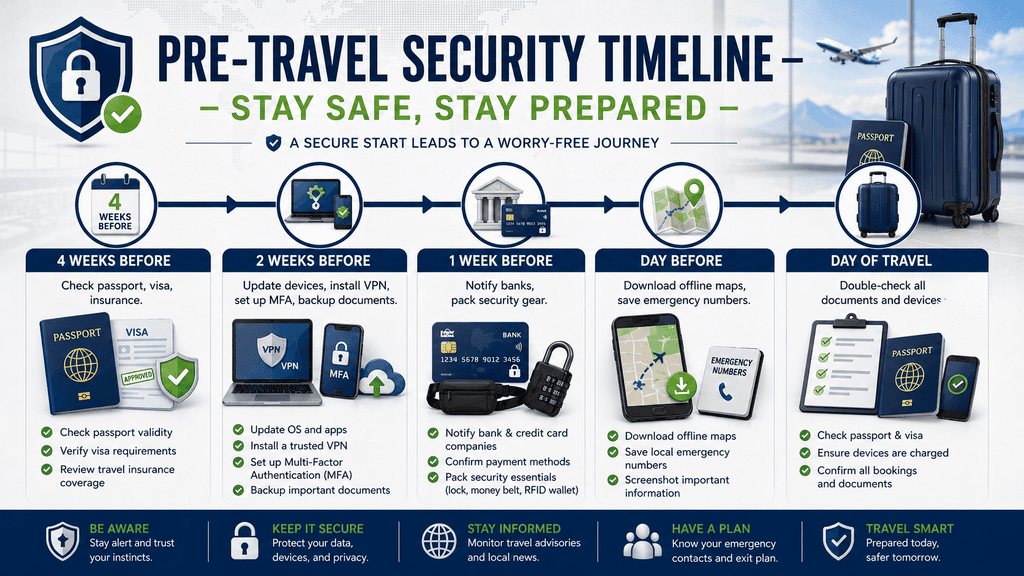
This timeline is a general planning framework. Adjust it according to your destination, departure date, travel documents, financial providers, and personal circumstances.
| When | Action | Purpose |
|---|---|---|
| Several Weeks Before | Check passport validity, entry requirements, insurance, and important bookings. | Identify document or planning issues early. |
| About Two Weeks Before | Update devices, review account security, enable MFA, and create backups. | Prepare your digital security before departure. |
| About One Week Before | Review banking arrangements, prepare backup payment methods, and organize security gear. | Reduce the impact of payment or wallet problems. |
| Day Before | Download offline maps, save emergency contacts, and check important documents. | Prepare for connectivity problems and unexpected situations. |
| Day of Travel | Confirm passport, wallet, devices, medications, and essential travel information are accessible. | Complete a final security check before departure. |
Final Thoughts
Travel security is primarily about preparation rather than fear. A few simple habits can reduce the impact of common problems without preventing you from enjoying the destination.
Keep important information backed up, protect your accounts, separate your payment methods, stay aware in crowded areas, and verify unexpected requests before taking action. If something does go wrong, contact the appropriate bank, service provider, local authority, insurer, or embassy as soon as practical.
Security requirements and risks vary between destinations, so use this guide as a planning framework and confirm current information through reliable official sources before your trip.
Stay prepared, stay aware, and enjoy your journey. 🛡️🌍✈️